Spring表达式(SpEL)一探究竟
本文深入探讨了Spring Expression Language (SpEL) 的设计与实现,重点分析了其源码结构、表达式解析与编译模式、计算上下文的功能组件及其实现。文章还通过一个自定义日志注解的示例,展示了如何利用SpEL和AOP简化日志记录代码。最后,介绍了SpringSecurity 6.3中注解参数功能的原理,展示了SpEL在Spring生态中的灵活应用。
文章目录
前言
Spring Expression Language (SpEL)是一种功能强大的表达式语言…打住,在阅读本文之前,我假设读者已经知道什么是SpEL以及相关的语法,这种网上一找一大把的文章我就没必要再赘述一遍了。本文里我会从源码探究一下SpEL的设计、一个应用场景、以及在SpringSecurity 6.3表达式注解参数特性的原理探究。
SpEL源码探究
设计
首先来看一下SpEL的整体抽象结构:
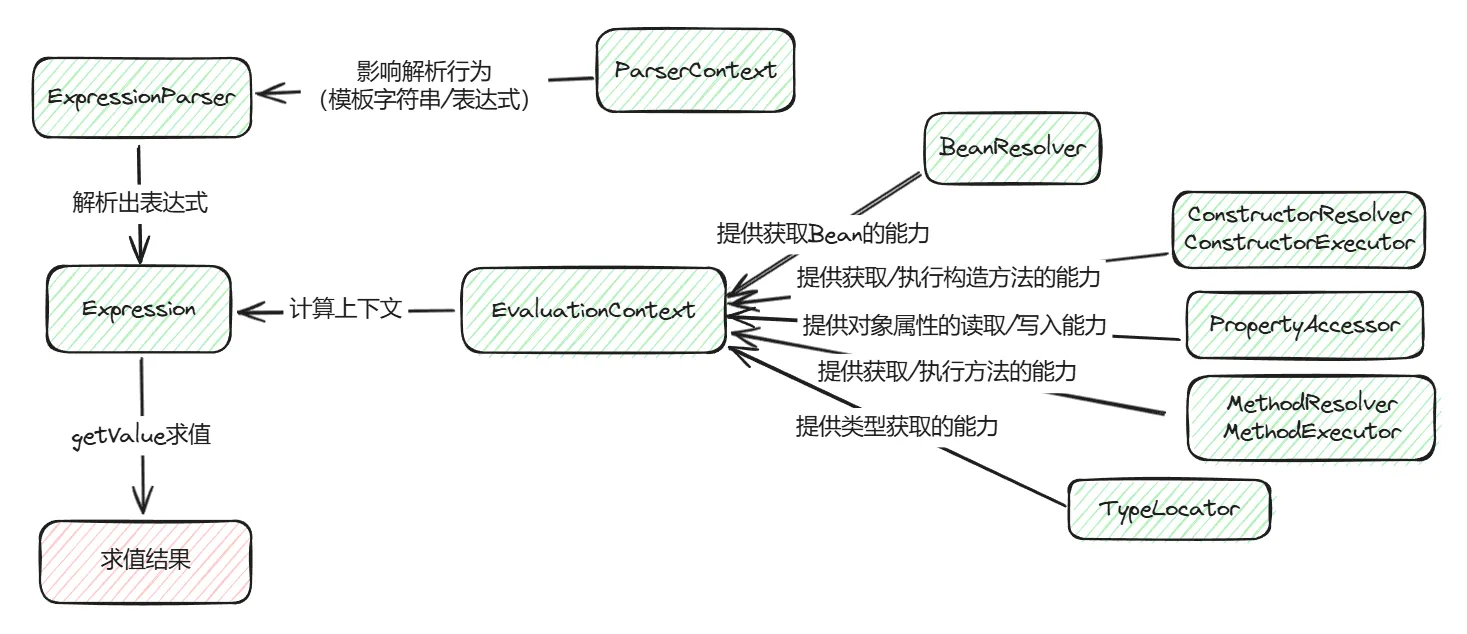
ExpressionParser是表达式解析的入口,在解析时可以接收一个ParserContext作为参数,ParserContext接口定义了boolean isTemplate(),会影响解析器是否将表达式视为模板字符串来解析,并且还定义了模板字符串中表达式的前后缀(比如前后缀为#{和},"Hello #{#param}"就是一个模板字符串,其中#param为表达式部分)。
解析完成后会返回一个Expression对象,代表我们传入的表达式,但是这个表达式还不一定可以立即求值,因为其中可能有变量、Bean引用、类型引用、方法执行等,我们需要给表达式配置一个上下文环境,使表达式可以从上下文中获取这些内容,这个上下文就是EvaluationContext(计算上下文)。EvaluationContext接口中抽象了表达式执行所需的各种能力的getter:
BeanResolver用于获取Bean,在表达式中获取Bean的语法为@beanName;ConstructorResolver允许使用类名和参数列表来解析对应的构造器执行器ConstructorExecutor,通过这个执行器来执行构造方法;MethodResolver、MethodExecutor和上一条类似,只是用于解析/执行实例方法和静态方法;PropertyAccessor用于访问实例字段/静态字段,其中区分了读取和写入两种场景;TypeLocator用于类型定位,比如当你想要调用类的静态方法或者访问静态属性时可以用T(className).method1('hello'),T(className).property1来实现
除此之外,计算上下文还定义了其他能力,如运算符重载等,这些特性都在赋予表达式各种各样的功能,使其更加强大。
实现
看完了设计部分,我们再来看看几个重要接口的实现。
表达式解析器
SpelExpressionParser作为我们直接使用的ExpressionParser的实现类,对外暴露了新的parseRaw方法,其内部又调用了doParseExpression方法,继续往下看,可以看到每次解析都是创建了一个新的InternalSpelExpressionParser进行解析,所以注释中写的该类实例可重用和线程安全也就不难理解了。
/** * SpEL parser. Instances are reusable and thread-safe. */public class SpelExpressionParser extends TemplateAwareExpressionParser {  private final SpelParserConfiguration configuration;
  public SpelExpressionParser() {    this.configuration = new SpelParserConfiguration();  }
  // 传入一个解析器配置,可以配置编译模式、编译模式下的ClassLoader等  // 关于编译模式下文会提到  public SpelExpressionParser(SpelParserConfiguration configuration) {    Assert.notNull(configuration, "SpelParserConfiguration must not be null");    this.configuration = configuration;  }
  public SpelExpression parseRaw(String expressionString) throws ParseException {    Assert.hasText(expressionString, "'expressionString' must not be null or blank");    return doParseExpression(expressionString, null);  }
@Override protected SpelExpression doParseExpression(String expressionString, @Nullable ParserContext context) throws ParseException { // 每次调用都新建一个InternalSpelExpressionParser来解析,所以该方法是线程安全的 return new InternalSpelExpressionParser(this.configuration).doParseExpression(expressionString, context); }}而其继承的TemplateAwareExpressionParser则实现了字符串模板的解析,将表达式的解析抽象成doParseExpression方法,交给实现类去处理。字符串模板的解析规则相对简单,只要把字符串部分提取出来,表达式部分交给实现类,所以SpelExpressionParser实例调用parseExpression来解析模板字符串也是线程安全的。
public abstract class TemplateAwareExpressionParser implements ExpressionParser {
  @Override  public Expression parseExpression(String expressionString) throws ParseException {    return parseExpression(expressionString, null);  }
  @Override  public Expression parseExpression(String expressionString, @Nullable ParserContext context) throws ParseException {    // 做了判断,ParserContext为模板类型时才进入字符串模板解析    if (context != null && context.isTemplate()) {      Assert.notNull(expressionString, "'expressionString' must not be null");      return parseTemplate(expressionString, context);    }    // 否则就进入表达式解析,doParseExpression是抽象方法,由实现类实现逻辑    else {      Assert.hasText(expressionString, "'expressionString' must not be null or blank");      return doParseExpression(expressionString, context);    }  }
  private Expression parseTemplate(String expressionString, ParserContext context) throws ParseException {    if (expressionString.isEmpty()) {      return new LiteralExpression("");    }
    // 解析逻辑在parseExpressions方法中    Expression[] expressions = parseExpressions(expressionString, context);    if (expressions.length == 1) {      return expressions[0];    }    else {      return new CompositeStringExpression(expressionString, expressions);    }  }
  private Expression[] parseExpressions(String expressionString, ParserContext context) throws ParseException {    List<Expression> expressions = new ArrayList<>(); // 节点列表    String prefix = context.getExpressionPrefix(); // 表达式前缀,通常是'#{'    String suffix = context.getExpressionSuffix(); // 表达式后缀,通常是'}'    int startIdx = 0;
    while (startIdx < expressionString.length()) {      int prefixIndex = expressionString.indexOf(prefix, startIdx);      // 找到一个表达式前缀      if (prefixIndex >= startIdx) {        // 表达式前缀之前有文本,将静态文本添加到节点列表        if (prefixIndex > startIdx) {          expressions.add(new LiteralExpression(expressionString.substring(startIdx, prefixIndex)));        }        int afterPrefixIndex = prefixIndex + prefix.length();        // 找表达式后缀        int suffixIndex = skipToCorrectEndSuffix(suffix, expressionString, afterPrefixIndex);
        // 这里忽略检查代码...包括找不到表达式后缀、表达式为空时的异常处理        // 以减少篇幅,有兴趣可查看源码
        String expr = expressionString.substring(prefixIndex + prefix.length(), suffixIndex);        expr = expr.trim();
        // 调用doParseExpression解析表达式,并添加到节点列表        expressions.add(doParseExpression(expr, context));        startIdx = suffixIndex + suffix.length();      }      else {        // 找不到表达式前缀了,将剩下的静态文本添加到节点列表        expressions.add(new LiteralExpression(expressionString.substring(startIdx)));        startIdx = expressionString.length();      }    }
return expressions.toArray(new Expression[0]); }}而表达式解析的真正逻辑则在InternalSpelExpressionParser类中,不过表达式的解析设计到分词、语法分析等多个内容,需要花不小篇幅来讲解,本文就暂时略过。最后,整个表达式会被解析成一棵抽象语法树(AST),包装成一个SpelExpression实例。
表达式(解释/编译)
到这里我们就得到表达式的解析结果SpelExpression了,我们可以通过一系列getValue的重载方法来计算表达式结果。表达式默认运行在解释模式下,这种情况下,每次计算都需要遍历AST树进行动态解释,优点是可以灵活处理各种情况,适用于上下文变量、根对象中的类型不确定/经常变化的情况,缺点就是大量使用反射,性能较差。
针对这种情况,SpEL推出了编译模式,可以通过字节码技术动态生成类来加快表达式的运行速度。还记得前面SpelExpressionParser的构造方法吗?可以传入一个SpelParserConfiguration来对parser进行配置,其中有一个参数compilerMode(类型为SpelCompilerMode枚举),用于设置表达式的编译行为,我们来看看这个这个枚举:
public enum SpelCompilerMode {  /**   * 关闭模式   * 即不对表达式进行编译,这个是默认选项。   */  OFF,
  /**   * 即时模式   * 该模式下,表达式会尽快被编译(通常在1次解释性运行之后)。如果编译后的表达式失败,它会向调用者抛出异常。   */  IMMEDIATE,
  /**   * 混合模式   * 该模式下,表达式计算会随着时间的推移在解释和编译之间悄悄切换。   * 运行几次后(默认100次),表达式会编译。如果后面编译的表达式运行失败(可能是因为推断出的类型信息发生变化),   * 那么将在内部捕获它,系统将切换回解释模式。之后可能会再次编译它(默认情况下失败次数大于100次则不再编译)。   */  MIXED}
所以我们可以通过以下代码来设置表达式编译模式,这里我写了一个稍微复杂的表达式,其中包含了属性访问、方法执行、实例化新对象、类型定位等操作:
public class CompileTest {  public static void main(String[] args) throws Exception {    runWithMode(SpelCompilerMode.IMMEDIATE);  }
  // 用于当根对象  public static class MyData {    public String name = "brooke_zb";    private int age = 18;    public int getAge() {      return age;    }  }
  public static void runWithMode(SpelCompilerMode mode) throws Exception {    System.out.println("==== " + mode.name() + " ====");    SpelExpressionParser parser = new SpelExpressionParser(      new SpelParserConfiguration(/* 设置编译模式 */ mode, CompileTest.class.getClassLoader())    );    SpelExpression expression = parser.parseRaw("name +'%.2f'.formatted((new Integer(10) + age) * 5 + 8 + T(Math).random())");
    for (int i = 0; i < 10; i++) {      long start = System.nanoTime();      Object result = expression.getValue(new MyData());      long end = System.nanoTime();      System.out.println("Compiled: " + isCompiled(expression) + "; Result: " + result + "; Time: " + (end - start) / 1000 + "μs");    }  }
/** * 观察表达式是否被编译了 */ private static boolean isCompiled(SpelExpression expression) throws Exception { Field field = expression.getClass().getDeclaredField("compiledAst"); // 这个字段是编译后的表达式 field.setAccessible(true); return field.get(expression) != null; }}为了更直观地对比,第一次我们传入SpelCompilerMode.OFF关闭编译模式,运行得到输出:
==== OFF ====Compiled: false; Result: brooke_zb148.46; Time: 69031μsCompiled: false; Result: brooke_zb148.74; Time: 509μsCompiled: false; Result: brooke_zb148.14; Time: 209μsCompiled: false; Result: brooke_zb148.17; Time: 207μsCompiled: false; Result: brooke_zb148.40; Time: 220μsCompiled: false; Result: brooke_zb148.04; Time: 171μsCompiled: false; Result: brooke_zb148.41; Time: 207μsCompiled: false; Result: brooke_zb148.84; Time: 247μsCompiled: false; Result: brooke_zb148.14; Time: 164μsCompiled: false; Result: brooke_zb148.12; Time: 174μs可以看到除了第一次运行耗时较长,后面几次运行都稳定在200微秒左右。
现在,修改代码传入SpelCompilerMode.IMMEDIATE来开启编译模式,再次运行得到输出:
==== IMMEDIATE ====Compiled: false; Result: brooke_zb148.68; Time: 63987μsCompiled: true; Result: brooke_zb148.75; Time: 57465μsCompiled: true; Result: brooke_zb148.65; Time: 93μsCompiled: true; Result: brooke_zb148.89; Time: 32μsCompiled: true; Result: brooke_zb148.61; Time: 26μsCompiled: true; Result: brooke_zb148.71; Time: 25μsCompiled: true; Result: brooke_zb148.94; Time: 26μsCompiled: true; Result: brooke_zb148.90; Time: 24μsCompiled: true; Result: brooke_zb148.30; Time: 24μsCompiled: true; Result: brooke_zb148.67; Time: 25μs这次可以看到,表达式第二次运行时耗费了较长时间编译成了动态类,然后在后续运行中稳定在20多微秒!(仅供参考,通过JMH能得到更具参考性的数据)
如果我们用Arthas在运行时把这个动态生成的类dump出来,就可以看到这个动态类的源码:
package spel;
import com.example.spel.CompileTest;import org.springframework.expression.EvaluationContext;import org.springframework.expression.EvaluationException;import org.springframework.expression.spel.CompiledExpression;
public class Ex2 extends CompiledExpression {  @Override  public Object getValue(Object object, EvaluationContext evaluationContext) throws EvaluationException {    Object[] objectArray = new Object[1];    objectArray[0] = (double)((new Integer(10) + ((CompileTest.MyData)object).getAge()) * 5 + 8) + Math.random();    return ((CompileTest.MyData)object).name + "%.2f".formatted(objectArray);  }}
编译模式使我们获得了如此优秀的性能,但是,古尔丹,代价是什么呢?
通过上面dump出来的动态类我们可以知道,编译模式下生成的类中,根对象、变量都是确定且不变的类型;并且既然是个java类,那么必然要遵循java的访问修饰符限制,如果把前面代码中的MyData改为私有内部类,那么必然也无法生成对应的动态类。
当然我们不能只靠猜测,阅读源码来验证我们的想法!
表达式的解析结果为一棵AST,其中所有AST节点都继承自SpelNodeImpl类,该类下有这么几个成员方法和编译相关:
public abstract class SpelNodeImpl implements SpelNode, Opcodes {  /**   * 检查节点是否可以编译成字节码。每个节点的推理可能不同,   * 但通常涉及检查节点的返回类型描述符是否已知以及任何相关的子节点是否可编译。   */  public boolean isCompilable() {    return false;  }
/** * 将此节点的字节码生成到提供的MethodVisitor中。 * 有关正在编译的当前表达式的上下文信息可在CodeFlow对象中获取, * 例如包括堆栈上当前对象的类型信息。 */ public void generateCode(MethodVisitor mv, CodeFlow cf) { throw new IllegalStateException(getClass().getName() +" has no generateCode(..) method"); }相关的AST节点类型有很多,无法在文中全部展开,这里挑两个作为示例,对其编译规则感兴趣的读者可以看看org.springframework.expression.spel.ast包下的节点实现。
// 加号操作符,省略其他代码public class OpPlus extends Operator { @Override public boolean isCompilable() { // 首先检查运算符左边的运算对象是否可编译 // 所有可编译的AST节点都会对子节点进行检查 // 即递归地扫描整棵树的节点是否都可以编译 if (!getLeftOperand().isCompilable()) { return false; } // 如果运算对象数量大于1,则表示二元加法 // 对右边的运算对象进行检查 if (this.children.length > 1) { if (!getRightOperand().isCompilable()) { return false; } } // 最后检查返回值的类型描述是否为空 // 通常在表达式运行过一次之后就可以知道返回值的类型 return (this.exitTypeDescriptor != null); }}// 三元操作符(a ? b : c),省略其他代码public class Ternary extends SpelNodeImpl { @Override public boolean isCompilable() { SpelNodeImpl condition = this.children[0]; // 条件a SpelNodeImpl left = this.children[1]; // 符合条件a时的返回值b SpelNodeImpl right = this.children[2]; // 不符合条件a时的返回值c // 递归检查AST是否能编译 return (condition.isCompilable() && left.isCompilable() && right.isCompilable() && // 检查条件a是否返回布尔值 CodeFlow.isBooleanCompatible(condition.exitTypeDescriptor) && // 返回值b和c的类型都确定的情况下才能编译,可分为两种情况 // 1. b和c都是字面量,在解析时就确定类型了 // 2. b或c需要经过一次运行才能确定类型,这种情况下只要其中一个分支没运行过就无法进行编译 left.exitTypeDescriptor != null && right.exitTypeDescriptor != null); }}相信至此你已经大概了解了编译模式原理和优缺点了,通过查看这一系列AST节点的源码,我总结了以下编译模式的限制:
- 需要使用或基于SpEL的标准实现(构造器解析器、字段访问器、方法解析器)
- 所有操作的类、方法、属性都必须是public修饰
- 所有引用的变量、根对象类型不能改变(若改变了类型,IMMEDIATE模式下会报错,MIXED模式下会退化为解释模式)
- 不支持赋值操作(如
property = 'newString') - 不支持Bean引用(如
@beanName.doSomething()) - 对于List字面量,其成员都需要是字面量(如
{'a', 'b', 'c'}) - 不支持Map字面量(如
{name: 'foo', age: 12}) - 对于方法调用,参数不能有强制转换
- 不支持自增/自减/幂运算符(如
a++、++a、2 ^ 3) - 不支持between语句和matches语句(如
1 between {0, 5}、'123' matches '\\d+') - 所有比较大小的计算符只支持同类型的数字类型进行比较(如
5 > 0.5是不支持编译的) - 不支持投影操作符(如
Members.![placeOfBirth.city]) - 不支持选择操作符(如
{1,2,3,4,5,6,7,8,9,10}.?{#isEven(#this)})
限制较多并且不好记,在实际使用中,我们一般使用MIXED模式,保证表达式至少有解释模式兜底。
计算上下文
接下来看看计算上下文EvaluationContext,这个接口有多个实现,我们先来看最基础的实现SimpleEvaluationContext:
// 省略部分代码public final class SimpleEvaluationContext implements EvaluationContext {  // 一个找不到任何类型的类型定位器实现  private static final TypeLocator typeNotFoundTypeLocator = typeName -> {    throw new SpelEvaluationException(SpelMessage.TYPE_NOT_FOUND, typeName);  };
  private final TypedValue rootObject;
  private final List<PropertyAccessor> propertyAccessors;
  private final List<MethodResolver> methodResolvers;
  private final Map<String, Object> variables = new HashMap<>();
  // 私有构造方法,仅能通过下面的Builder类构造实例,典型的建造者模式  private SimpleEvaluationContext(List<PropertyAccessor> accessors, List<MethodResolver> resolvers,      TypeConverter converter, TypedValue rootObject) {
    this.propertyAccessors = accessors;    this.methodResolvers = resolvers;    this.rootObject = (rootObject != null ? rootObject : TypedValue.NULL);  }
  // SimpleEvaluationContext不支持表达式内调用构造函数  @Override  public List<ConstructorResolver> getConstructorResolvers() {    return Collections.emptyList();  }
  // SimpleEvaluationContext不支持表达式内引用bean,即不支持@beanName语法  @Override  public BeanResolver getBeanResolver() {    return null;  }
  // SimpleEvaluationContext不支持表达式内类型定位,即不支持T(className)语法  @Override  public TypeLocator getTypeLocator() {    return typeNotFoundTypeLocator;  }
  // SimpleEvaluationContext不支持表达式内为变量赋值  @Override  public TypedValue assignVariable(String name, Supplier<TypedValue> valueSupplier) {    throw new SpelEvaluationException(SpelMessage.VARIABLE_ASSIGNMENT_NOT_SUPPORTED, "#" + name);  }
  // ==========仅能用下面3个方法来创建Builder,以构造SimpleEvaluationContext实例==========
  // 通过自定义PropertyAccessor实现属性访问,并且不能是通用的反射实现  public static Builder forPropertyAccessors(PropertyAccessor... accessors) {    for (PropertyAccessor accessor : accessors) {      if (accessor.getClass() == ReflectivePropertyAccessor.class) {        throw new IllegalArgumentException("SimpleEvaluationContext is not designed for use with a plain " +            "ReflectivePropertyAccessor. Consider using DataBindingPropertyAccessor or a custom subclass.");      }    }    return new Builder(accessors);  }
  // 使用只读的属性访问器,DataBindingPropertyAccessor的设计目的是为了调用一些通用的getter/setter或公共属性  // 并且不支持访问Object、Class、ClassLoader中的属性  public static Builder forReadOnlyDataBinding() {    return new Builder(DataBindingPropertyAccessor.forReadOnlyAccess());  }
  // 使用支持读写的字段访问器,同上  public static Builder forReadWriteDataBinding() {    return new Builder(DataBindingPropertyAccessor.forReadWriteAccess());  }
  /**   * 用于构造SimpleEvaluationContext的Builder   */  public static final class Builder {
    private final List<PropertyAccessor> accessors;
    private List<MethodResolver> resolvers = Collections.emptyList();
    private TypedValue rootObject;
    // 私有构造器,仅能通过前面SimpleEvaluationContext的三个静态方法间接调用    private Builder(PropertyAccessor... accessors) {      this.accessors = Arrays.asList(accessors);    }
    // 通过自定义MethodResolver实现方法调用,并且不能是通用的反射实现    public Builder withMethodResolvers(MethodResolver... resolvers) {      for (MethodResolver resolver : resolvers) {        if (resolver.getClass() == ReflectiveMethodResolver.class) {          throw new IllegalArgumentException("SimpleEvaluationContext is not designed for use with a plain " +              "ReflectiveMethodResolver. Consider using DataBindingMethodResolver or a custom subclass.");        }      }      this.resolvers = Arrays.asList(resolvers);      return this;    }
    // 使用通用的方法处理器,仅支持调用实例方法    // 并且不支持调用Object、Class、ClassLoader中的方法    public Builder withInstanceMethods() {      this.resolvers = Collections.singletonList(DataBindingMethodResolver.forInstanceMethodInvocation());      return this;    }
    // 设置根对象    public Builder withRootObject(Object rootObject) {      this.rootObject = new TypedValue(rootObject);      return this;    }
    // 同上    public Builder withTypedRootObject(Object rootObject, TypeDescriptor typeDescriptor) {      this.rootObject = new TypedValue(rootObject, typeDescriptor);      return this;    }
public SimpleEvaluationContext build() { return new SimpleEvaluationContext(this.accessors, this.resolvers, this.typeConverter, this.rootObject); } }}从代码可以看出,SimpleEvaluationContext有不少限制:
- 不支持Bean引用
- 无法调用构造方法
- 不支持类型定位、调用静态方法
- 不支持表达式内变量赋值
- 属性访问和方法调用有限制,不能是
Object、Class、ClassLoader中的属性/方法
所以SimpleEvaluationContext是一个安全的上下文实现,代价是牺牲了一部分功能。
而实际使用得更多的是StandardEvaluationContext,这是一个标准的上下文实现,实现了接口中定义的所有功能,通过前面的结构图我们知道上下文的功能取决于可插拔的能力组件,所以了解StandardEvaluationContext只需要了解这些组件的实现。
在开始之前,需要注意一下StandardEvaluationContext这些组件默认实现的特点:
- 可以获取非public声明的类(如私有的静态内部类)
- 无法获取非public声明的成员变量、静态变量、方法、构造器
类型定位器
先来看看类型定位器TypeLocator的标准实现StandardTypeLocator:
public class StandardTypeLocator implements TypeLocator {
  @Nullable  private final ClassLoader classLoader;
  // 前缀列表,在列表内的前缀相当于import xxx.*;  private final List<String> importPrefixes = new ArrayList<>(1);
  // 类型定位缓存,避免每次都去解析类名  private final Map<String, Class<?>> typeCache = new ConcurrentHashMap<>();
  public StandardTypeLocator() {    this(ClassUtils.getDefaultClassLoader());  }
  public StandardTypeLocator(@Nullable ClassLoader classLoader) {    this.classLoader = classLoader;    // 默认导入了java.lang前缀,跟我们写java代码一样    registerImport("java.lang");  }
  public void registerImport(String prefix) {    this.importPrefixes.add(prefix);  }
  public void removeImport(String prefix) {    this.importPrefixes.remove(prefix);  }
  public List<String> getImportPrefixes() {    return Collections.unmodifiableList(this.importPrefixes);  }
  @Override  public Class<?> findType(String typeName) throws EvaluationException {    // 先从缓存中查找    Class<?> cachedType = this.typeCache.get(typeName);    if (cachedType != null) {      return cachedType;    }
    // 缓存中没有再去解析类名    Class<?> loadedType = loadType(typeName);    if (loadedType != null) {      if (!(this.classLoader instanceof SmartClassLoader scl && scl.isClassReloadable(loadedType))) {        this.typeCache.put(typeName, loadedType);      }      return loadedType;    }
    // 找不到类    throw new SpelEvaluationException(SpelMessage.TYPE_NOT_FOUND, typeName);  }
  @Nullable  private Class<?> loadType(String typeName) {    // 通过反射获取对应的Class对象    try {      // 最终使用Class.forName()来加载类,所以可以加载非公共类      return ClassUtils.forName(typeName, this.classLoader);    }    catch (ClassNotFoundException ex) {      // try any registered prefixes before giving up    }
// 尝试拼接前缀,再进行查找 for (String prefix : this.importPrefixes) { try { String nameToLookup = prefix + '.' + typeName; return ClassUtils.forName(nameToLookup, this.classLoader); } catch (ClassNotFoundException ex) { // might be a different prefix } } return null; }}可以看到,StandardTypeLocator使用反射来加载类对象,并且支持往定位器中注册包名前缀,简化表达式的书写,以下是一个示例:
package com.example.spel;
public class TypeLocatorTest {  public static final String HELLO = "world";
  public static void main(String[] args) {    StandardEvaluationContext ctx = new StandardEvaluationContext();    StandardTypeLocator locator = new StandardTypeLocator();    locator.registerImport("com.example.spel"); // 注册com.example.spel包前缀    ctx.setTypeLocator(locator);
    SpelExpressionParser parser = new SpelExpressionParser();    System.out.println(parser.parseRaw("T(TypeLocatorTest).HELLO").getValue(ctx));    // 输出: world  }}
构造器解析器
接下来看看构造器解析器的标准实现ReflectiveConstructorResolver,从名字就可以看出来该解析器也是使用反射来实现的。
public class ReflectiveConstructorResolver implements ConstructorResolver {
  @Override  @Nullable  public ConstructorExecutor resolve(EvaluationContext context, String typeName, List<TypeDescriptor> argumentTypes)      throws AccessException {
    try {      TypeConverter typeConverter = context.getTypeConverter();      Class<?> type = context.getTypeLocator().findType(typeName); // 使用类型定位器获取Class对象      Constructor<?>[] ctors = type.getConstructors(); // 获取所有public构造器
      Arrays.sort(ctors, Comparator.comparingInt(Constructor::getParameterCount));
      Constructor<?> closeMatch = null;      Constructor<?> matchRequiringConversion = null;
      for (Constructor<?> ctor : ctors) {        int paramCount = ctor.getParameterCount();
        // 封装构造器参数的类型描述列表        List<TypeDescriptor> paramDescriptors = new ArrayList<>(paramCount);        for (int i = 0; i < paramCount; i++) {          paramDescriptors.add(new TypeDescriptor(new MethodParameter(ctor, i)));        }        ReflectionHelper.ArgumentsMatchInfo matchInfo = null;
        // 构造器包含变长参数时,检查参数列表类型是否符合        if (ctor.isVarArgs() && argumentTypes.size() >= paramCount - 1) {          matchInfo = ReflectionHelper.compareArgumentsVarargs(paramDescriptors, argumentTypes, typeConverter);        }
        // 参数数量一致时,检查参数列表类型是否符合        else if (paramCount == argumentTypes.size()) {          matchInfo = ReflectionHelper.compareArguments(paramDescriptors, argumentTypes, typeConverter);        }        if (matchInfo != null) {          // 参数类型完全符合          if (matchInfo.isExactMatch()) {            return new ReflectiveConstructorExecutor(ctor);          }          // 参数类型可以隐式转换,比如ArrayList转为List          else if (matchInfo.isCloseMatch()) {            closeMatch = ctor;          }          // 参数需要显式转换,比如List转为ArrayList          else if (matchInfo.isMatchRequiringConversion()) {            matchRequiringConversion = ctor;          }        }      }      // 但是无论参数类型是完全符合、可以隐式转换还是需要显示转换      // 最终都是封装为ReflectiveConstructorExecutor      if (closeMatch != null) {        return new ReflectiveConstructorExecutor(closeMatch);      }      else if (matchRequiringConversion != null) {        return new ReflectiveConstructorExecutor(matchRequiringConversion);      }      else {        return null;      }    }    catch (EvaluationException ex) {      throw new AccessException("Failed to resolve constructor", ex);    }  }
}可以看到,解析到符合的构造器后,最终都是封装为ReflectiveConstructorExecutor返回,而最终构造方法也是在对应Executor中执行,无非也是调用Constructor#newInstance方法创建实例,还是反射那一套,这里就不赘述了。
方法解析器
方法解析器的默认实现为ReflectiveMethodResolver,原理和ReflectiveConstructorResolver类似。除此之外,我们还可以通过registerMethodFilter方法注册对于特定类的方法过滤器,以过滤掉一些不希望暴露的方法。
字段访问器
字段访问器的默认实现为ReflectivePropertyAccessor,也是通过反射来实现读写,支持类成员变量和静态变量的读写以及getter/setter方法。
public class ReflectivePropertyAccessor implements PropertyAccessor {
  private static final Set<Class<?>> ANY_TYPES = Collections.emptySet();
  private static final Set<Class<?>> BOOLEAN_TYPES = Set.of(Boolean.class, boolean.class);
  // 是否可写  private final boolean allowWrite;
  // 读写器的缓存  private final Map<PropertyCacheKey, InvokerPair> readerCache = new ConcurrentHashMap<>(64);  private final Map<PropertyCacheKey, Member> writerCache = new ConcurrentHashMap<>(64);
  private final Map<PropertyCacheKey, TypeDescriptor> typeDescriptorCache = new ConcurrentHashMap<>(64);
  private final Map<Class<?>, Method[]> sortedMethodsCache = new ConcurrentHashMap<>(64);
  @Nullable  private volatile InvokerPair lastReadInvokerPair;
  // 无参构造则默认可读写  public ReflectivePropertyAccessor() {    this.allowWrite = true;  }
  public ReflectivePropertyAccessor(boolean allowWrite) {    this.allowWrite = allowWrite;  }
  @Override  public boolean canRead(EvaluationContext context, @Nullable Object target, String name) throws AccessException {    if (target == null) {      return false;    }
    // 对数组类型的length属性进行特判    Class<?> type = (target instanceof Class<?> clazz ? clazz : target.getClass());    if (type.isArray() && name.equals("length")) {      return true;    }
    // 先从缓存里找    PropertyCacheKey cacheKey = new PropertyCacheKey(type, name, target instanceof Class);    if (this.readerCache.containsKey(cacheKey)) {      return true;    }
    // 查找该字段的getter方法,如果target是Class对象则仅查找静态方法    // 这个方法最终调用Class#getMethods方法,所以只会查找public方法    Method method = findGetterForProperty(name, type, target);    if (method != null) {      // 找到了getter方法,包装为invoker放入缓存      Property property = new Property(type, method, null);      TypeDescriptor typeDescriptor = new TypeDescriptor(property);      method = ClassUtils.getInterfaceMethodIfPossible(method, type);      this.readerCache.put(cacheKey, new InvokerPair(method, typeDescriptor));      this.typeDescriptorCache.put(cacheKey, typeDescriptor);      return true;    }    else {      // 找不到getter时再去找字段本身,如果target是Class对象则仅查找静态变量      // 这个方法最终调用Class#getFields方法,所以只会查找public变量      Field field = findField(name, type, target);      if (field != null) {        // 同样包装为invoker放入缓存        TypeDescriptor typeDescriptor = new TypeDescriptor(field);        this.readerCache.put(cacheKey, new InvokerPair(field, typeDescriptor));        this.typeDescriptorCache.put(cacheKey, typeDescriptor);        return true;      }    }
    return false;  }
  @Override  public TypedValue read(EvaluationContext context, @Nullable Object target, String name) throws AccessException {    Assert.state(target != null, "Target must not be null");    Class<?> type = (target instanceof Class<?> clazz ? clazz : target.getClass());
    // 防止target是数组类的情况下误取了length字段    if (type.isArray() && name.equals("length")) {      if (target instanceof Class) {        throw new AccessException("Cannot access length on array class itself");      }      return new TypedValue(Array.getLength(target));    }
    // 从缓存拿invoker    PropertyCacheKey cacheKey = new PropertyCacheKey(type, name, target instanceof Class);    InvokerPair invoker = this.readerCache.get(cacheKey);    this.lastReadInvokerPair = invoker;
    // 区分getter方法和字段,这俩执行逻辑不一样    // 适用于getter方法的执行逻辑    if (invoker == null || invoker.member instanceof Method) {      Method method = (Method) (invoker != null ? invoker.member : null);
      // 兜底处理,防止缓存里没有invoker      if (method == null) {        method = findGetterForProperty(name, type, target);        if (method != null) {          Property property = new Property(type, method, null);          TypeDescriptor typeDescriptor = new TypeDescriptor(property);          method = ClassUtils.getInterfaceMethodIfPossible(method, type);          invoker = new InvokerPair(method, typeDescriptor);          this.lastReadInvokerPair = invoker;          this.readerCache.put(cacheKey, invoker);        }      }      if (method != null) {        // 执行getter方法        try {          ReflectionUtils.makeAccessible(method);          Object value = method.invoke(target);          return new TypedValue(value, invoker.typeDescriptor.narrow(value));        }        catch (Exception ex) {          throw new AccessException("Unable to access property '" + name + "' through getter method", ex);        }      }    }    // 适用于字段的执行逻辑    if (invoker == null || invoker.member instanceof Field) {      Field field = (Field) (invoker == null ? null : invoker.member);
      // 兜底处理,防止缓存里没有invoker      if (field == null) {        field = findField(name, type, target);        if (field != null) {          invoker = new InvokerPair(field, new TypeDescriptor(field));          this.lastReadInvokerPair = invoker;          this.readerCache.put(cacheKey, invoker);        }      }      if (field != null) {        // 获取target的对应属性        try {          ReflectionUtils.makeAccessible(field);          Object value = field.get(target);          return new TypedValue(value, invoker.typeDescriptor.narrow(value));        }        catch (Exception ex) {          throw new AccessException("Unable to access field '" + name + "'", ex);        }      }    }
    throw new AccessException("Neither getter method nor field found for property '" + name + "'");  }
  @Override  public boolean canWrite(EvaluationContext context, @Nullable Object target, String name) throws AccessException {    // 和canRead方法逻辑差不多,区别点有二    //   1. 额外判断allowWrite字段是否为true    //   2. getter获取变setter获取  }
  @Override  public void write(EvaluationContext context, @Nullable Object target, String name, @Nullable Object newValue)      throws AccessException {    // 同上,和read方法逻辑差不多  }
  // 获取getter的逻辑  @Nullable  private Method findGetterForProperty(String propertyName, Class<?> clazz, Object target) {    boolean targetIsAClass = (target instanceof Class);
    // target对象为Class时获取静态方法    Method method = findGetterForProperty(propertyName, clazz, targetIsAClass);    if (method == null && targetIsAClass) {      // 获取不到时尝试获取Class类内的静态方法      method = findGetterForProperty(propertyName, Class.class, false);    }    return method;  }
  @Nullable  protected Method findGetterForProperty(String propertyName, Class<?> clazz, boolean mustBeStatic) {    Method method = findMethodForProperty(getPropertyMethodSuffixes(propertyName),        "get", clazz, mustBeStatic, 0, ANY_TYPES);    if (method == null) {      method = findMethodForProperty(getPropertyMethodSuffixes(propertyName),          "is", clazz, mustBeStatic, 0, BOOLEAN_TYPES);      if (method == null) {        // Record-style plain accessor method, e.g. name()        method = findMethodForProperty(new String[] {propertyName},            "", clazz, mustBeStatic, 0, ANY_TYPES);      }    }    return method;  }
  // 获取setter的逻辑  @Nullable  private Method findSetterForProperty(String propertyName, Class<?> clazz, Object target) {    Method method = findSetterForProperty(propertyName, clazz, target instanceof Class);    // 和获取getter逻辑不同的是,Class类没有任何静态setter,也就没必要尝试去Class内获取了    return method;  }
  @Nullable  protected Method findSetterForProperty(String propertyName, Class<?> clazz, boolean mustBeStatic) {    return findMethodForProperty(getPropertyMethodSuffixes(propertyName),        "set", clazz, mustBeStatic, 1, ANY_TYPES);  }
  private record InvokerPair(Member member, TypeDescriptor typeDescriptor) {}
  // 字段描述的缓存键  private static final class PropertyCacheKey implements Comparable<PropertyCacheKey> {
    private final Class<?> clazz;
    private final String property;
    private final boolean targetIsClass;
    public PropertyCacheKey(Class<?> clazz, String name, boolean targetIsClass) {      this.clazz = clazz;      this.property = name;      this.targetIsClass = targetIsClass;    }
    // 省略equals、hashCode、compareTo、toString方法  }}
Bean解析器
作为最常用的功能之一,BeanResolver接口定义了通过表达式访问Bean的能力,该接口有一个基于Spring IoC容器的标准实现BeanFactoryResolver,但创建StandardEvaluationContext时并不会提供该实现,而是需要使用者通过StandardEvaluationContext#setBeanResolver方法手动设置。这是因为SpEL作为Spring的底层核心组件之一,并不依赖Spring的bean容器,所以SpEL可以独立使用,而无需和Spring生态绑定。
BeanFactoryResolver的实现也十分简单,保存从构造器传入的BeanFactory对象,后续从该Factory中获取对应的Bean。
public class BeanFactoryResolver implements BeanResolver {
  private final BeanFactory beanFactory;
  public BeanFactoryResolver(BeanFactory beanFactory) {    Assert.notNull(beanFactory, "BeanFactory must not be null");    this.beanFactory = beanFactory;  }
  @Override  public Object resolve(EvaluationContext context, String beanName) throws AccessException {    try {      return this.beanFactory.getBean(beanName);    }    catch (BeansException ex) {      throw new AccessException("Could not resolve bean reference against BeanFactory", ex);    }  }}
自定义日志注解示例
Talk is cheap. Show me the code.
这里我们以一个业务中十分常见的场景——日志记录 作为例子,一步步展示如何利用AOP+SpEL来简化日志代码的重复编写。
利用注解+AOP机制完成日志记录也是老生常谈的话题了,在我们最初方案中,我们设计了以下注解:
/** * 自动记录操作日志 */@Target({ElementType.METHOD})@Retention(RetentionPolicy.RUNTIME)@Documentedpublic @interface OperationLog {  /**   * 业务类型   *   * @see com.example.enums.BusinessType   */  BusinessType business();
/** * 操作类型 * * @see com.example.enums.OperationType */ OperationType operation();}其中BusinessType和OperationType为枚举类型,然后利用AOP完成日志记录操作:
@Aspect@Componentpublic class OperationLogAspect {  /**   * 处理完请求后执行   *   * @param joinPoint 切点   */  @AfterReturning(pointcut = "@annotation(operationLog)", returning = "result")  public void doAfterReturning(JoinPoint joinPoint, OperationLog operationLog, Object result) {    handleLog(joinPoint, operationLog, null, result);  }
  /**   * 拦截异常操作   *   * @param joinPoint 切点   * @param e     异常   */  @AfterThrowing(value = "@annotation(operationLog)", throwing = "e")  public void doAfterThrowing(JoinPoint joinPoint, OperationLog operationLog, Exception e) {    handleLog(joinPoint, operationLog, e, null);  }
  protected void handleLog(final JoinPoint joinPoint, OperationLog operationLog, final Exception e, Object result) {    String params = toJson(joinPoint.getArgs()); // 把参数封装为json    String respResult = e == null ? toJson(result) : toJson(e);    String business = operationLog.business().name;    String operation = operationLog.operation().name;
// 省略日志入库代码... }}一番操作下来,我们就可以用@OperationLog(business = BusinessType.CAR, operation = OperationType.INSERT)这种方式来记录操作日志了,适用绝大多数场景。
但是过了一段时间,我们发现一些场景下该注解不够灵活,比如有时需要根据参数中某个字段来决定记录的业务类型,以及是否需要记录日志,这种情况下只能手动插入日志记录代码,不够优雅。于是,我们利用SpEL对其进行了改造:
/** * 自动记录操作日志 */@Target({ElementType.METHOD})@Retention(RetentionPolicy.RUNTIME)@Documentedpublic @interface OperationLog {  /**   * 业务类型表达式,需返回BusinessType枚举   *   * @see com.example.enums.BusinessType   */  String business();
  /**   * 操作类型表达式,需返回OperationType枚举   *   * @see com.example.enums.OperationType   */  String operation();
  /**   * 是否记录日志表达式,需返回boolean   */  String loggable() default "true";}
将注解中的参数都改为字符串类型,然后新增一个loggable属性用于判断是否记录日志。
@Aspect@Componentpublic class OperationLogAspect {  // 表达式解析器,开启MIXED编译模式  private static final SpelExpressionParser SPEL_PARSER = new SpelExpressionParser(      new SpelParserConfiguration(SpelCompilerMode.MIXED, OperationLogAspect.class.getClassLoader())  );  // 表达式缓存  private static final ConcurrentMap<String, SpelExpression> SPEL_CACHE = new ConcurrentHashMap<>();
  /**   * 处理完请求后执行   *   * @param joinPoint 切点   */  @AfterReturning(pointcut = "@annotation(operationLog)", returning = "result")  public void doAfterReturning(JoinPoint joinPoint, OperationLog operationLog, Object result) {    handleLog(joinPoint, operationLog, null, result);  }
  /**   * 拦截异常操作   *   * @param joinPoint 切点   * @param e     异常   */  @AfterThrowing(value = "@annotation(operationLog)", throwing = "e")  public void doAfterThrowing(JoinPoint joinPoint, OperationLog operationLog, Exception e) {    handleLog(joinPoint, operationLog, e, null);  }
  protected void handleLog(final JoinPoint joinPoint, OperationLog operationLog, final Exception e, Object result) {    String params = toJson(joinPoint.getArgs()); // 把参数封装为json    String respResult = e == null ? toJson(result) : toJson(e);
    // 检查是否需要记录日志    Boolean loggable = getSpelValue(joinPoint, operationLog.loggable(), Boolean.class);    if (!loggable) {      return;    }
    String business = getSpelValue(joinPoint, operationLog.business(), BusinessType.class).name;    String operation = getSpelValue(joinPoint, operationLog.operation(), OperationType.class).name;
    // 省略日志入库代码...  }
  /**   * 解析spel表达式,用于获取注解中的表达式返回值   */  private <T> T getSpelValue(JoinPoint joinPoint, Object result, String spel, Class<T> resultType) {    MethodSignature signature = (MethodSignature) joinPoint.getSignature();    // 先从缓存中获取,不存在时再去解析    if (!SPEL_CACHE.containsKey(spel)) {      SPEL_CACHE.put(spel, SPEL_PARSER.parseRaw(spel));    }    SpelExpression expression = SPEL_CACHE.get(spel);
    // 创建一个标准上下文,把目标方法上的参数和返回值添加进去    StandardEvaluationContext ctx = new StandardEvaluationContext();    Object[] args = joinPoint.getArgs();    for (int i = 0; i < args.length; i++) {      ctx.setVariable("p" + i, args[i]);      ctx.setVariable(signature.getParameterNames()[i], args[i]); // 编译参数需添加-parameters才能保留参数名    }    ctx.setVariable("result", result);
    // 把枚举类添加到上下文参数中    // 以便用'#t.CAR'代替'T(BusinessType).CAR'这种冗长写法    if (resultType == BusinessType.class || resultType == OperationType.class) {      ctx.setRootObject(resultType);      ctx.setVariable("t", resultType);    }    ctx.setBeanResolver(new BeanFactoryResolver(beanFactory));    return expression.getValue(ctx, resultType);  }}
至此,我们完成了日志注解的改造,可以根据上下文场景更灵活地完成日志的记录。
@OperationLog( business = "#param.type == 1 ? #t.CAR : #t.BIKE", operation = "#t.UPDATE", loggable = "#result.updateCount > 0")public Result mayUpdateSomething(Param param) { // ...}IDEA推荐插件
由于IDEA不知道自定义注解的参数是普通的字符串还是SpEL表达式,写起来没有语法提示和纠错,所以,这里推荐一个插件:SpEL Assistant
安装该插件后,通过在项目resources文件夹下创建配置文件spel-extension.json,配置对应的类方法路径,以及参数等信息,就可以享受到IDEA语法提示和纠错带来的便利。上述日志注解例子的配置文件示例如下:
{ "com.example.annotation.OperationLog@business": { "method": { "result": true, "resultName": "result", "parameters": true, "parametersPrefix": ["p"] }, "fields": { "root": "com.example.enums.BusinessType", "t": "com.example.enums.BusinessType" } }, "com.example.annotation.OperationLog@operation": { "method": { "result": true, "resultName": "result", "parameters": true, "parametersPrefix": ["p"] }, "fields": { "root": "com.example.enums.OperationType", "t": "com.example.enums.OperationType" } }, "com.example.annotation.OperationLog@loggable": { "method": { "result": true, "resultName": "result", "parameters": true, "parametersPrefix": ["p"] }, "fields": {} }}SpringSecurity 6.3中的注解参数功能原理
最后来讲一个和SpEL有关的比较新的特性。在SpringSecurity 6.3中,提供了注解参数的功能,以支持自由度更高的自定义注解。详见该issue:Add Meta-annotation Parameter Support · Issue #14480
通过查看对应pr的修改,可以看到其原理是通过org.springframework.util.PropertyPlaceholderHelper,将大括号括起来的内容作为占位符解析,查找对应的值并进行替换(在表达式解析之前)。(PropertyPlaceholderHelper作为一个占位符工具类,在Spring中有大量应用场景,如属性值注入:@Value("${spring.profiles.active:dev}")),而这个值则来自自定义注解里的参数,举一个自定义角色鉴权注解的例子:
// 省略其他必要元注解@PreAuthorize("hasRole('base_{value}')")public @interface RequireRole { String value();}@Controllerpublic class ResourceController { @RequireRole("admin") // 等同于@PreAuthorize("hasRole('base_admin')") public String hello() { return "world"; }}不过这个占位符解析是有限制的,对于正常的大括号内(数据、Map)嵌套参数就无法替换,这里我们举一个例子:
假设有个自定义注解包含参数param,其值为"value1",对于"{'defaultValue', '{param}'}"这个表达式,一个String数组内嵌套了一个占位符param,这种情况下,表达式的解析结果会保持原样,不做任何替换。
这是因为在PropertyPlaceholderHelper#parseStringValue方法中,对于占位符的解析是递归进行的,第一次会将声明数组的大括号解析为占位符'defaultValue', '{param}',然后继续递归解析,解析到占位符param并替换后将'defaultValue', 'value1'这个值作为占位符继续查找替换值,而这个占位符明显不是一个方法名,自然找不到对应的值,也就不会进行替换。不过想想注解参数这个功能一般也不会用在这种复杂场景中。